
Light Notes1.0.2 - Get APK
You'll be able to download in few seconds.
Publisher Description
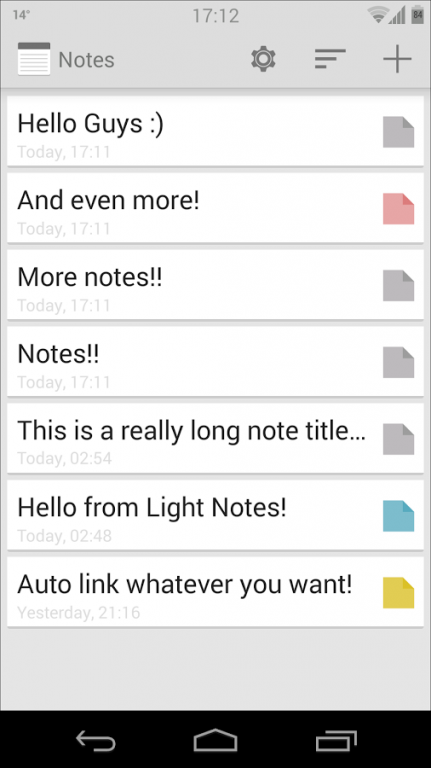
Light Notes is a simplistic, clean and fast note taking app.
Use it everday to manage your shopping lists, writing down your thoughts or anything else!
Light Notes has been designed with simplicity in mind.
★ FEATURES ★
- Colorized notes: Categorize your notes by color
- Sort notes by color, creation or last edited date
- Pin notes to the statusbar to never forget anything again
- Backup notes to the sdcard
- Import your backups on any device
- Auto backup your notes
- Share your notes directly from the app
- Export notes as standard txt files
- Minimalistic holo design
★ USED PERMISSIONS ★
- Internet: Used for a tiny ad on the bottom of the notes list
- Read/Write external Storage: Used for exporting and importing notes to/from sdcard
- Billing: InApp purchase to remove advertising
★ LANGUAGES ★
Currently Light Notes supports the following languages:
- English
- German
Want to help me to localize Light Notes to your language or found a bug?
Also you can tell me about features you would like to see in Light Notes.
eMail me or check out my thread over at xda-developers:
http://forum.xda-developers.com/showthread.php?t=2716592
Oh, you can also find me on twitter: @MythosXe
_____
Keywords: Notes, Notepad, Notebook, Organizer, List, Shopping, Memo, Post it, Sticky Note, Memo pad, Editor, Texteditor, Text, Holo, Notizen, Notizblock, Merkzettel, Listen, Einkaufsliste, Einkaufszettel
About Light Notes
The company that develops Light Notes is ChrisXe. The latest version released by its developer is 1.0.2.
To install Light Notes on your Android device, just click the green Continue To App button above to start the installation process. The app is listed on our website since 2014-05-19 and was downloaded 0 times. We have already checked if the download link is safe, however for your own protection we recommend that you scan the downloaded app with your antivirus. Your antivirus may detect the Light Notes as malware as malware if the download link to com.chrisxe.lightnotes is broken.
How to install Light Notes on your Android device:
- Click on the Continue To App button on our website. This will redirect you to Google Play.
- Once the Light Notes is shown in the Google Play listing of your Android device, you can start its download and installation. Tap on the Install button located below the search bar and to the right of the app icon.
- A pop-up window with the permissions required by Light Notes will be shown. Click on Accept to continue the process.
- Light Notes will be downloaded onto your device, displaying a progress. Once the download completes, the installation will start and you'll get a notification after the installation is finished.
Program Details
System requirements
Download information
Pricing
Version History
version 1.0.2
posted on 2014-05-19
*** Fixed a bug where the app would crash on some devices when you saved an edited note (Hopefully! I dont have the right device to test it myself. Please let me know if it works)
Disclaimer
External Download
We do not host Light Notes on our servers. We did not scan it for viruses, adware, spyware or other type of malware. This app is hosted by Galad and passed their terms and conditions to be listed there. We recommend caution when installing it.
The APK Download link for Light Notes is provided to you by apps112.com without any warranties, representations or guarantees of any kind, so access it at your own risk.
If you have questions regarding this particular app contact the publisher directly. For questions about the functionalities of apps112.com contact us.
